Current Map and Pose API
Set Current Map
There are several ways to set the current map:
- Using a
map_idormap_uid. - Providing the map data directly (available since version 2.7.0).
- Loading from a local file (available since version 2.11.0).
curl -X POST \
  -H "Content-Type: application/json" \
  -d '{"map_id": 286}' \
  http://192.168.25.25:8090/chassis/current-map
Request Parameters
class SetCurrentMapRequest {
  map_id?: number; // Either 'map_id' or 'map_uid' must be provided.

  // Available since version 2.5.2. The map can be identified by its "uid".
  // In earlier versions, only 'map_id' was supported.
  map_uid?: string;
}
Set Current Map with Data
Starting from version 2.7.0, you can use the following POST request to set the current map directly. Note: This method can be very slow for large maps.
class SetCurrentMapWithDataRequest {
  map_name: string;
  occupancy_grid: string; // Base64-encoded PNG image.
  carto_map: string; // Binary map data.
  grid_resolution: number; // e.g., 0.05
  grid_origin_x: number; // The X-coordinate of the lower-left corner of the PNG map.
  grid_origin_y: number; // The Y-coordinate of the lower-left corner of the PNG map.
  overlays: string; // Refer to the documentation on overlays.
}
Set Current Map by Loading Local Files
Starting from version 2.11.0, the current map can be loaded directly from a local file on the robot.
curl -X POST http://localhost:8090/chassis/current-map \
  -H "Content-Type: application/json"
  --data '{"data_url":"file:///home/simba/tmp_map/map_73.pbstream", "map_name": "xxx"}'
Three files are required:
/home/simba/tmp_map/map_73.pbstream
/home/simba/tmp_map/map_73.png
/home/simba/tmp_map/map_73.yaml
The YAML file should contain the following structure:
uid: 62202f9fed0883652d08ad5c
grid_origin_x: -5.900000095367432
grid_origin_y: -9.199999809265137
grid_resolution: 0.05
map_version: 3
overlays_version: 1
overlays: { "map_uid": "62202f9fed0883652d08ad5c", "features": [] }
Get Current Map
curl http://192.168.25.25:8090/chassis/current-map
{
  "id": 287,
  "uid": "62202f9fed0883652d08ad5c",
  "map_name": "26层",
  "create_time": 1647862075,
  "map_version": 15,
  "overlays_version": 25
}
The id corresponds to an entry in the Map List. If the current map was set directly with data, the id will be -1.
The latched WebSocket topic /map/info contains information about the currently active map. A new message is broadcast on this topic whenever the current map changes.
$ wscat -c ws://192.168.25.25:8090/ws/v2/topics
> {"enable_topic": "/map/info"}
< {
  "topic": "/map/info",
  "name": "26层",
  "uid": "62202f9fed0883652d08ad5c",
  "map_version": 15,
  "overlays_version": 25,
  "overlays": {...}
}
Set Pose
Sets the pose (position and orientation) of the robot on the current map.
curl -X POST \
  -H "Content-Type: application/json" \
  -d '{"position": [0, 0, 0], "ori": 1.57}' \
  http://192.168.25.25:8090/chassis/pose
Request Parameters
class SetPoseRequest {
  position: [number, number, number]; // Coordinates [x, y, z]. Note that `z` is always 0.
  ori: number; // The heading of the robot in radians, measured counter-clockwise. A value of 0 corresponds to the positive X-axis.

  // [Optional]
  // If true, the system will attempt to correct initial position errors within a small area.
  // If false, no correction will be attempted.
  // If not provided, the behavior is undefined and may vary depending on the software version,
  // environment, and global settings.
  adjust_position?: boolean;
}
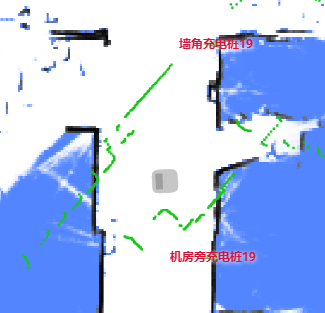
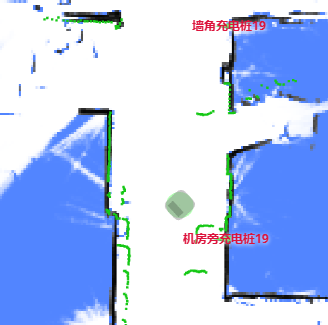
When adjust_position is set to true, the system detects and corrects initial position errors based on Lidar observations. For instance, if the robot's heading is incorrectly assigned, the system will make its best effort to correct it.
| Before Correction | After Correction |
|---|---|
 |  |
Warning
The correction algorithm can occasionally be misguided by changes in the environment. Therefore, if you are certain the initial pose is correct—especially in environments with potentially misleading patterns—ensure that adjust_position is set to false.
Pose Feedback
The latched WebSocket topic /tracked_pose provides the latest robot pose.
$ wscat -c ws://192.168.25.25:8090/ws/v2/topics
> {"enable_topic": "/tracked_pose"}
< {"topic": "/tracked_pose", "pos": [-3.553, -0.288], "ori": -1.28}
< {"topic": "/tracked_pose", "pos": [-3.55, -0.285], "ori": -1.28}