System Settings
Supported since 2.9.0.
The system settings structure is as follows:
- schema.json (read-only) - Contains metadata for all settings, including names, types, ranges, and descriptions.
- default.json (read-only) - Contains the default values for all settings.
- user.json - Stores values modified by the user.
- effective.json (read-only) - Contains the final values, generated by overlaying
user.jsonon top ofdefault.json.
Only user.json is modifiable. Whenever it is updated, effective.json is automatically recalculated.
schema.json and default.json are read-only constants specific to the robot model.
Schema
curl http://192.168.25.25:8090/system/settings/schema
{
  "ax": [
    {
      "name": "robot.footprint",
      "title": "Robot: Footprint",
      "type": "Polygon",
      "default": [[0.248, 0.108], ["..."], [0.248, -0.108]]
    },
    {
      "name": "control.auto_hold",
      "title": "Control: Auto Hold",
      "type": "bool",
      "default": true,
      "description": "When idle, the robot shall hold still"
    },
    {
      "name": "control.max_forward_velocity",
      "title": "Control: Max Forward Velocity",
      "type": "float",
      "default": 1.2,
      "range": "[0, 2.0]"
    },
    {
      "name": "control.max_backward_velocity",
      "title": "Control: Max Backward Velocity",
      "type": "float",
      "default": -0.2,
      "range": "[-0.3, 0]"
    },
    {
      "name": "control.max_forward_acc",
      "title": "Control: Max Forward Acc",
      "type": "float",
      "default": 0.5,
      "range": "[0, 0.8]"
    },
    {
      "name": "control.max_forward_decel",
      "title": "Control: Max Forward Decel",
      "type": "float",
      "default": -2.0,
      "range": "[-2.0, 0]"
    },
    {
      "name": "control.max_angular_velocity",
      "title": "Control: Max Angular Velocity",
      "type": "float",
      "default": 1.2,
      "range": "[0, 1.2]"
    },
    {
      "name": "control.acc_smoother.smooth_level",
      "title": "Control: Acc Smoother: Smooth Level",
      "type": "Enum",
      "default": "normal",
      "options": ["disabled", "lower", "normal", "higher"]
    },
    {
      "name": "bump_based_speed_limit.enable",
      "title": "enable bump-based speed limit",
      "type": "bool",
      "default": true
    },
    {
      "name": "bump_based_speed_limit.bump_tolerance",
      "title": "Bump Based Speed Limit: Bump Tolerance",
      "type": "float",
      "default": 0.5,
      "range": "[0, 1.0]"
    }
  ]
}
Default Settings
curl http://192.168.25.25:8090/system/settings/default
User Settings
Retrieve user settings:
curl http://192.168.25.25:8090/system/settings/user
Save user settings:
curl -X POST \
    -H "Content-Type: application/json" \
    -d '...' \
    http://192.168.25.25:8090/system/settings/user
Partial update of user settings:
curl -X PATCH \
    -H "Content-Type: application/json" \
    -d '...' \
    http://192.168.25.25:8090/system/settings/user
Effective Settings
curl http://192.168.25.25:8090/system/settings/effective
Setting Options
This section documents available configuration options.
rack.specs
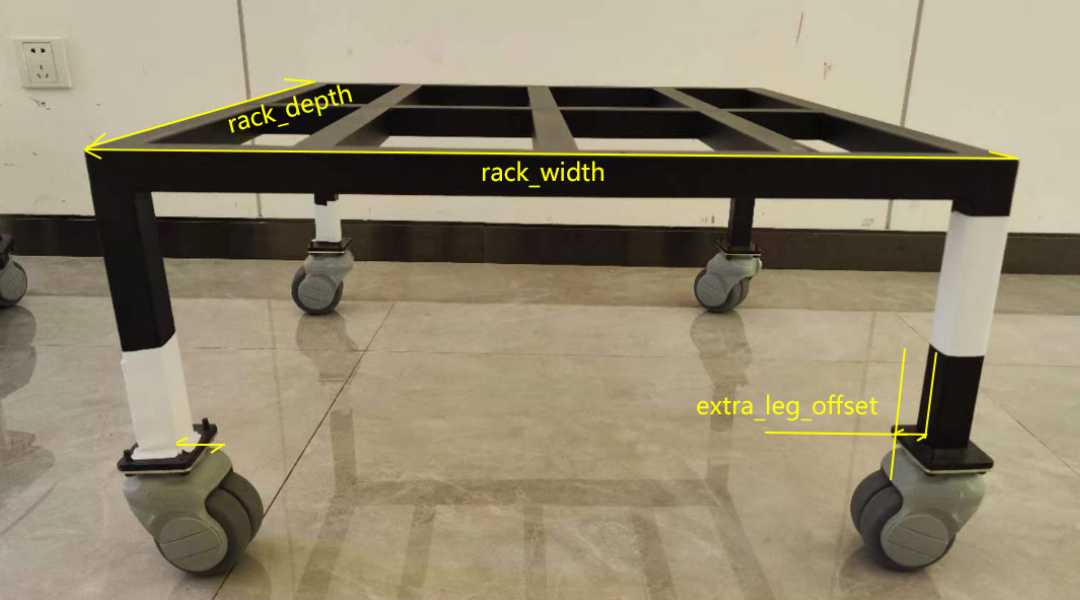
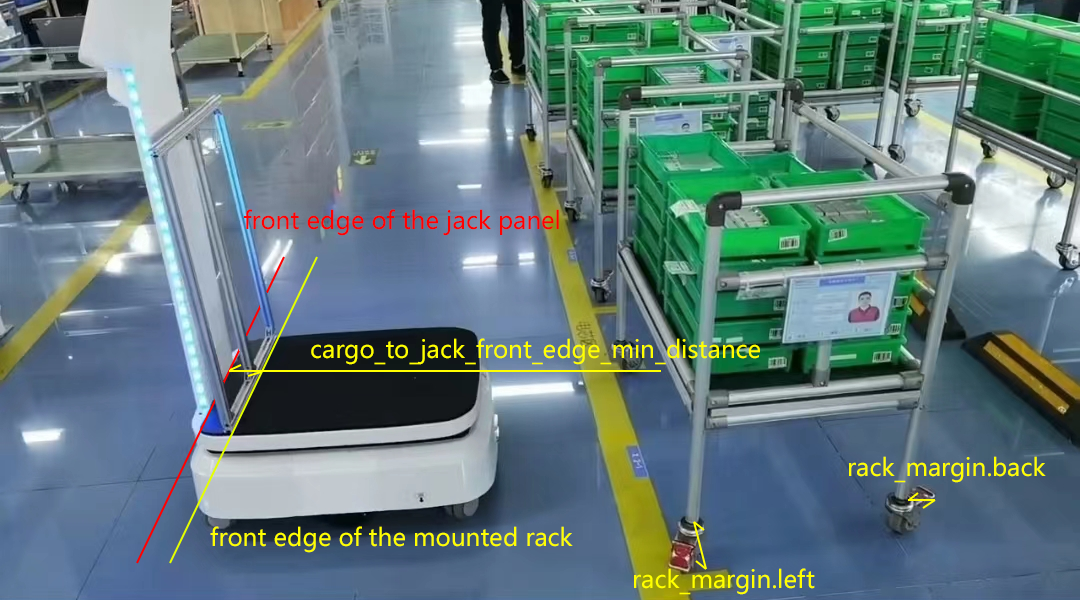
Defines the physical dimensions of a rack and how the robot should interact with it.
{
  "rack.specs": [
    {
      "width": 0.66,
      "depth": 0.7,

      // Some racks have protruding parts (e.g., handles) that
      // extend beyond the wheel base.
      "margin": [0, 0, 0, 0],

      "alignment": "center", // center/back.
      "alignment_margin_back": 0.02,

      // Some rack legs have base plates that are invisible to the laser scanner.
      // The robot will avoid this extra area when moving underneath the rack.
      "extra_leg_offset": 0.02,

      // Since 2.10: square/round/other
      "leg_shape": "square",

      // Since 2.10: The side length of a square leg, or the diameter of a round leg.
      "leg_size": 0.03,

      // Since 2.10. Some racks have caster wheels that are invisible to
      // the robot's lasers. Use this parameter to expand the robot's
      // footprint and prevent collisions.
      "foot_radius": 0.05
    }
  ]
}
width,depth: The dimensions of the rack.margin: Accounts for protruding parts outside the rectangle formed by the legs.extra_leg_offset: Accounts for inward-protruding legs that are not visible to the LiDAR.cargo_to_jack_front_edge_min_distance: The distance between the front edge of the rack and the front edge of the jack panel when the rack is mounted.