Robot Parameters API
Warning
DEPRECATED: Please use System Settings instead.
Get Parameters
curl http://192.168.25.25:8090/robot-params
{
  "/wheel_control/max_forward_velocity": 0.8,
  "/wheel_control/max_backward_velocity": -0.2,
  "/wheel_control/max_forward_acc": 0.26,
  "/wheel_control/max_forward_decel": -2.0,
  "/wheel_control/max_angular_velocity": 0.78,
  "/wheel_control/acc_smoother/smooth_level": "normal", // Available since version 2.7.0. Options: "disabled", "lower", "normal", "higher".
  "/planning/auto_hold": true, // Available since version 2.3.0.
  "/control/bump_tolerance": 0.5, // Available since version 2.4.0.
  "/control/bump_based_speed_limit/enable": true, // Available since version 2.7.4.
  "/robot/footprint": [[0.248, 0.108], [0.24, 0.174], "...", [0.248, -0.108]] // Available since version 2.5.0.
}
The /planning/auto_hold parameter determines whether the wheels are locked or free when the robot is idle. When auto_hold is disabled and the robot is not performing a task, it can be freely pushed or dragged. This is useful for manually adjusting the robot's heading or positioning it for loading goods. However, if the robot is on a steep slope, the wheels will remain locked for safety, even if auto_hold is disabled.
The /control/bump_based_speed_limit/enable parameter determines whether the robot uses detected bumpiness to automatically decelerate. The /control/bump_tolerance parameter sets the robot's sensitivity to bumpiness. The value ranges from 0 to 1, with 0.5 as the neutral setting. The robot will slow down when detected bumpiness exceeds the tolerance level. The system also learns the locations of door sills and other bumpy areas on the map, allowing the robot to decelerate in advance. A larger value makes the robot less sensitive to bumpiness. A smaller value causes the robot to move more cautiously (slowing down more for door sills and uneven surfaces).
Set Parameters
Multiple parameters can be updated in a single request.
curl -X POST \
  -H "Content-Type: application/json" \
  -d '{"/wheel_control/max_forward_velocity": 1.2, "/control/bump_tolerance": 0.5}' \
  http://192.168.25.25:8090/robot-params
Get Default Parameters
curl http://192.168.25.25:8090/robot-params/default # Available since version 2.7.6.
Robot Footprint
The /robot/footprint parameter should accurately represent the top-down profile of the robot. This footprint is used for collision detection and must be configured correctly to ensure safe operation. The footprint data must adhere to the following rules:
- The origin (0,0) must be the rotation center of the robot.
- The X-axis points to the robot's right, and the Y-axis points to the robot's front.
- The polygon MUST BE CONVEX.
- The polygon should not be closed (i.e., the first point should not be repeated as the last point).
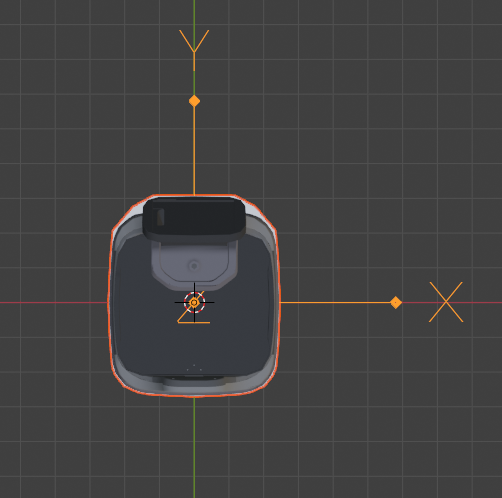
Starting from version 2.7.0, you can use the Robot Model Topic to monitor real-time changes to the footprint. For example, when a rack is mounted, the footprint automatically updates to the combined convex hull of the robot and the rack.