Calibration
Calibrate the IMU, cameras, and lidars. Run each calibration with the robot on a level surface and the surrounding area clear.
Recalibrate IMU
Initiates IMU calibration. The robot must remain perfectly still on a hard, flat surface during this process.
curl -X POST \
  -H "Content-Type: application/json" \
  http://192.168.25.25:8090/services/imu/recalibrate
This service call only triggers the calibration; the actual process typically takes 10 to 20 seconds to complete.
Once the calibration is finished, a notification will be sent via the /action WebSocket topic.
Sample Success Output:
{
  "topic": "/action",
  "timestamp": 1681733608.653,
  "email": "",
  "username": "",
  "deviceName": "718220110000909",
  "action": "recalibrate_imu",
  "message": "IMU calibration succeeded"
}
Sample Failure Output:
{
  "topic": "/action",
  "timestamp": 1681733580.702,
  "email": "",
  "username": "",
  "deviceName": "718220110000909",
  "action": "recalibrate_imu",
  "message": "error: IMU calibration failed. Failed to rotate to right"
}
Calibrate Gyroscope Scale
Initiates gyroscope scale calibration. The robot must remain perfectly still on a hard, flat surface during this process.
curl -X POST \
  -H "Content-Type: application/json" \
  http://192.168.25.25:8090/services/imu/calibrate_gyro_scale
This service call only triggers the calibration; the actual process typically takes about 20 seconds to complete.
Once the calibration is finished, a notification will be sent via the /action WebSocket topic.
Sample Success Output:
{
  "topic": "/action",
  "timestamp": 1681733608.653,
  "email": "",
  "username": "",
  "deviceName": "718220110000909",
  "action": "calibrate_gyro_scale",
  "message": "Gyroscope scale calibration succeeded"
}
Sample Failure Output:
{
  "topic": "/action",
  "timestamp": 1681733580.702,
  "email": "",
  "username": "",
  "deviceName": "718220110000909",
  "action": "calibrate_gyro_scale",
  "message": "error: Gyroscope scale calibration failed. Please remove nearby obstacles."
}
Clear Gyro Scale
Proxies to the /imu/clear_gyro_scale ROS service (std_srvs/Trigger) provided by imu_node. Clears the IMU gyro scale calibration, marking the gyro as not calibrated.
Route
POST /ros/imu/clear_gyro_scale
Request
No parameters, no request body. Accept is ignored — the response is always application/json.
Response
200 application/json:
{ "success": true, "message": "Gyro scale cleared." }
Additional error codes
| Status | Meaning |
|---|---|
500 | imu_node returned success = false; body is its message |
502 | ROS service call failed |
504 | ROS service was unavailable before timeout |
Example
curl -X POST http://192.168.25.25:8090/ros/imu/clear_gyro_scale
SDK usage
import { RobotApi } from "@kingsimba/axbot-sdk/robotApi";

const api = new RobotApi({ apiBase: "http://192.168.25.25:8090" });
await api.clearGyroScale();
Calibrate Depth Cameras
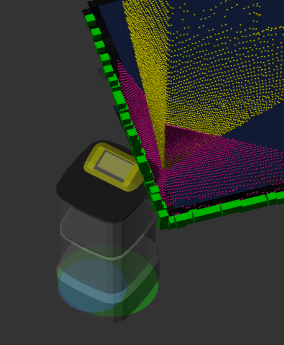
This service aligns the point clouds from the depth cameras with the point cloud from the horizontal Lidar.
Before initiating calibration, ensure that:
- The robot is on a flat, level surface.
- The robot is facing a wall corner or a large, rectangular object.
POST /services/calibrate_depth_cameras
Calibrate Depth Camera Masks
Some depth cameras may capture parts of the robot's own body. This service identifies which pixels should be masked to prevent the robot from mistaking itself for an obstacle.
Before calibrating, place the robot in an open area with no obstacles in the field of view of any depth cameras.
curl -X POST http://192.168.25.25:8090/services/calibrate_depth_camera_masks
Calibrate Duo Lidar Poses
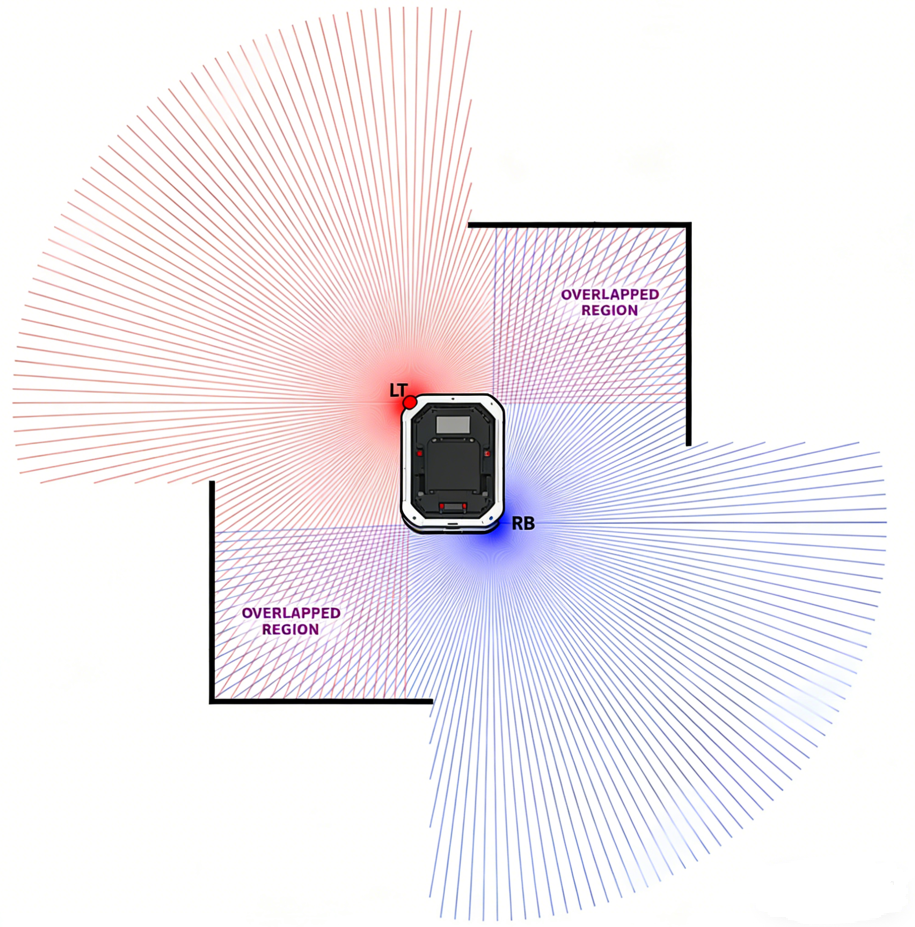
This service is used to calibrate the poses of duo lidars mounted at the left-front and right-back corners. This service should only be called when "caps.supportsDuoLidar" is true.
The service accepts an optional calibration_step parameter that selects the calibration mode:
interface CalibrateDuoLidarPosesRequest {
  calibration_step?: "single_shot" | "right_wall" | "front_wall";
}
Single Shot Mode (Default)
Requires clear horizontal and vertical walls in one of the overlapping areas of the duo lidars' fields of view.
curl -X POST \
  -H "Content-Type: application/json" \
  http://192.168.25.25:8090/services/calibrate_duo_lidar_poses
Right Wall Mode
Use this and Front Wall Mode when two perpendicular walls are hard to find. Only a single long wall is required.
During calibration, ensure:
- There should be a single long wall on the right side of the robot.
- The distance between the right side of the robot and the wall should be 1 – 2 meters.
- The wall must be long enough to be visible to both lidars.
- The wall and the right side of the robot should be precisely parallel — tolerance less than 0.5°.
- The ground should be flat.
curl -X POST \
  -H "Content-Type: application/json" \
  -d '{"calibration_step": "right_wall"}' \
  http://192.168.25.25:8090/services/calibrate_duo_lidar_poses
Front Wall Mode
Run Right Wall Mode first, then rotate the robot to face the same wall.
During calibration, ensure:
- Finish right wall mode calibration first.
- The wall must be long enough to be visible to both lidars.
- The wall must be at least 2 meters away from the robot.
- The wall can be approximately parallel to the front edge of the robot — maximum tolerance of 5°.
curl -X POST \
  -H "Content-Type: application/json" \
  -d '{"calibration_step": "front_wall"}' \
  http://192.168.25.25:8090/services/calibrate_duo_lidar_poses
Calibrate Mast Tick Base
Proxies to the /calibrate_mast_tick_base ROS service (std_srvs/Trigger) provided by jack_mast_node. Triggers a mast tick-base calibration.
Route
POST /ros/jack_mast/calibrate_mast_tick_base
Request
No parameters, no request body. Accept is ignored — the response is always application/json.
Response
200 application/json:
{ "success": true, "message": "..." }
Additional error codes
| Status | Meaning |
|---|---|
500 | jack_mast_node returned success = false; body is its message |
502 | ROS service call failed |
504 | ROS service was unavailable before timeout |
Example
curl -X POST http://192.168.25.25:8090/ros/jack_mast/calibrate_mast_tick_base