Motion & Chassis Control
Switch drive modes, engage or release the emergency stop, and recover from chassis faults.
Set Control Mode
curl -X POST \
  -H "Content-Type: application/json" \
  -d '{"control_mode": "auto"}' \
  http://192.168.25.25:8090/services/wheel_control/set_control_mode
Parameters
class SetControlModeRequest {
  control_mode: "auto" | "manual" | "remote";
}
Use the /wheel_state WebSocket topic to monitor the current control mode and wheel status.
$ wscat -c ws://192.168.25.25:8090/ws/v2/topics
> {"enable_topic": "/wheel_state"}
< {"topic": "/wheel_state", "control_mode": "auto", "emergency_stop_pressed": true }
Set or Clear Emergency Stop
curl -X POST \
  -H "Content-Type: application/json" \
  -d '{"enable": true}' \
  http://192.168.25.25:8090/services/wheel_control/set_emergency_stop
Parameters
class SetEmergencyStopRequest {
  enable: boolean;
}
Use the /wheel_state WebSocket topic to monitor the emergency stop status.
$ wscat -c ws://192.168.25.25:8090/ws/v2/topics
> {"enable_topic": "/wheel_state"}
< {"topic": "/wheel_state", "control_mode": "auto", "emergency_stop_pressed": true }
Confirm Emergency Stop
When the robot is on a slope or in a designated slope area (specified in overlays), the wheels will not be released even if the emergency stop is pressed. A warning message will appear in the /alerts WebSocket topic:
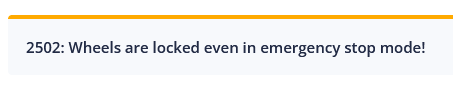
If you need to push the robot manually, use the following command to confirm releasing the wheels.
curl -X POST http://192.168.25.25:8090/services/confirm_estop
Clear Wheel Errors
curl -X POST http://192.168.25.25:8090/services/wheel_control/clear_errors
Clear Flip Error
Error 8004 (flip error) indicates a serious issue, such as the robot having tipped over. This requires manual inspection. Once the issue is resolved, use this service to clear the error and restore the robot to an operational state.
curl -X POST http://192.168.25.25:8090/services/monitor/clear_flip_error
Clear Slide Error
Warning
Experimental Feature
Error 2008 (slide error) indicates that the robot may have had a significant impact with an invisible obstacle. Manual inspection is required before clearing this error.
curl -X POST http://192.168.25.25:8090/services/monitor/clear_slipping_error