Localization
Locate the robot on its map and query the pose of points of interest around it.
Start Global Positioning
curl -X POST \
  -H "Content-Type: application/json"
  http://192.168.25.25:8090/services/start_global_positioning
Parameters
interface StartGlobalPositioningRequest {
  use_barcode?: boolean; // default to true.
  use_base_map_match?: boolean; // default to true.
}
Feedback can be monitored via the Global Positioning State WebSocket topic.
Barcode
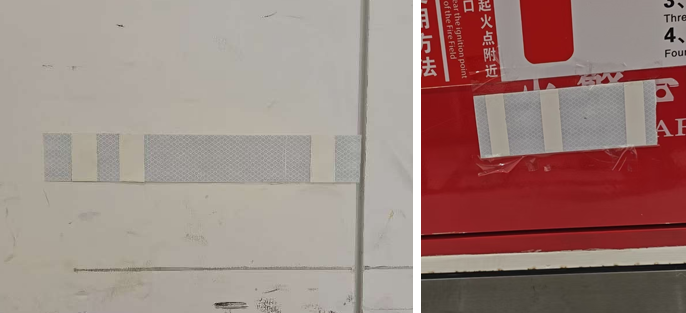
A barcode is a marker composed of interleaved reflective and non-reflective surfaces. Each barcode at a site contains a unique ID, allowing the robot to determine its exact location unambiguously upon detection.
When use_barcode is set to true, it takes priority over point-cloud-based matching. Detected barcode matches are always considered highly reliable. To utilize this feature, barcodes and their corresponding poses must be collected and added to the map's overlays.
Query Pose
This API retrieves the coordinates of various points of interest (POIs).
For example, when the robot docks on a charger, it calculates the charger’s pose based on the robot’s position.
curl http://192.168.25.25:8090/services/query_pose/charger_pose
{
  "pose": {
    "pos": [4.179, -26.094],
    "ori": 3.18
  }
}
Similarly, if a robot (e.g., a forklift or a trailer robot) is parked at a cargo location (e.g., a pallet or trailer), the system can infer the location's pose from the robot's current position.
curl http://192.168.25.25:8090/services/query_pose/pallet_pose
curl http://192.168.25.25:8090/services/query_pose/trailer_pose
{
  "pose": {
    "pos": [4.179, -26.094],
    "ori": 3.18
  },

  // Since 2.13.0. If reference == 'center_of_front_edge', the returned pose is
  // the center of the pallet or trailer's front edge (new logic).
  // Otherwise, the pose is the center of the pallet or trailer (deprecated).
  "ref": "center_of_front_edge"
}
Rack Pose
Calculates the pose of the jack plate's front or rear edge based on the robot's current position. This is useful for defining rack POI coordinates on the map.
The ref query parameter specifies which edge to use:
center_of_front_edge(default) — the center of the jack plate's front edgecenter_of_rear_edge— the center of the jack plate's rear edge
curl http://192.168.25.25:8090/services/query_pose/rack_pose?ref=center_of_front_edge
{
  "pose": {
    "pos": [1.234, 5.678], // Calculated rack edge coordinates [x, y] in the world frame
    "ori": 1.571 // Yaw angle in the world frame (radians)
  },
  // Which edge was calculated: "center_of_front_edge" or "center_of_rear_edge"
  "ref": "center_of_front_edge"
}