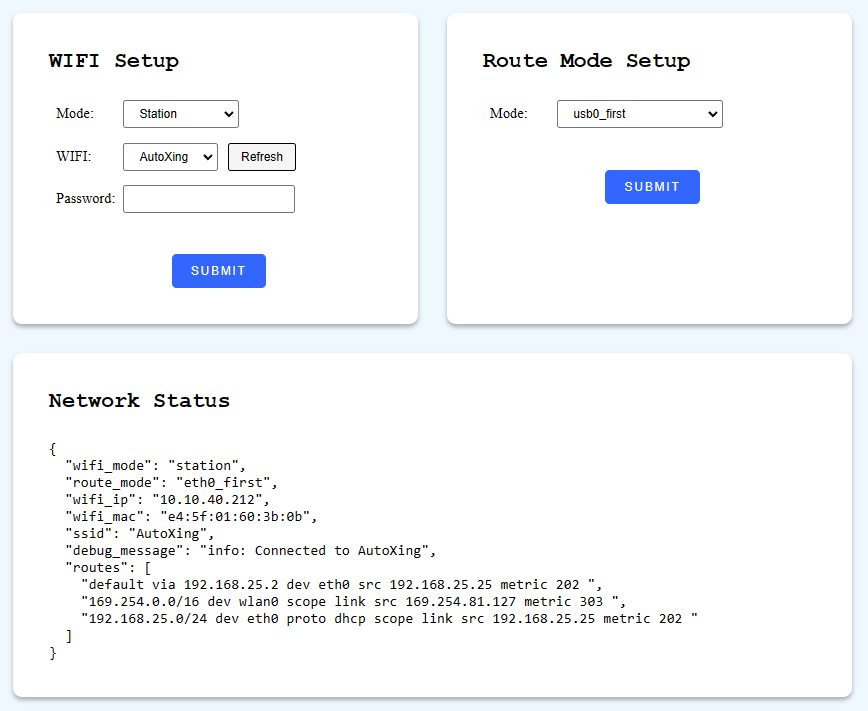
Network
Configure Wi-Fi and routing on the robot's network interfaces.
Configure Wi-Fi
Switches the Wi-Fi between Access Point (AP) and Station mode.
curl -X POST \
  -H "Content-Type: application/json" \
  -d '{"mode": "station", "ssid":"xxxxxxxxx", "psk": "xxxxx"}' \
  http://192.168.25.25:8090/services/setup_wifi
Parameters
interface SetupWifiRequest {
  mode: "ap" | "station";
  ssid?: string; // SSID, required for station mode
  psk?: string; // Wi-Fi Protected Access Pre-Shared Key, required for station mode

  route_mode?: "eth0_first" | "wlan0_first" | "usb0_first" | "wlan0_usb0_auto_first";
}
Set Route Mode
Configures the routing table rules for the robot's chassis.
curl -X POST \
  -H "Content-Type: application/json" \
  -d '{"mode": "xxx"}' \
  http://192.168.25.25:8090/services/set_route_mode
Parameters
interface RouteModeRequest {
  mode: "eth0_first" | "wlan0_first" | "usb0_first" | "wlan0_usb0_auto_first";
}
route_mode: Determines the priority of network interfaces in the routing table:
eth0_first: Setseth0as the default route, if available.wlan0_first: Setswlan0as the default route, if available.usb0_first: Setsusb0as the default route, if available.wlan0_usb0_auto_first: Based onpingresults: ifwlan0has internet connectivity, it is used as the default route; otherwise,usb0is used.
A static HTML page for network configuration is also available on the local network at: http://192.168.25.25:8090/wifi_setup