系统设置 (System Settings)
自 2.9.0 版本起支持。
系统设置结构如下:
- schema.json (只读) - 包含所有设置的元数据,包括名称、类型、范围和描述。
- default.json (只读) - 包含所有设置的默认值。
- user.json - 存储用户修改的值。
- effective.json (只读) - 包含最终生效的值,由
user.json覆盖在default.json之上生成。
仅 user.json 可修改。每当它更新时,effective.json 会自动重新计算。
schema.json 和 default.json 是特定于机器人型号的只读常量。
架构 (Schema)
curl http://192.168.25.25:8090/system/settings/schema
{
  "ax": [
    {
      "name": "robot.footprint",
      "title": "机器人:轮廓 (Footprint)",
      "type": "Polygon",
      "default": [[0.248, 0.108], ["..."], [0.248, -0.108]]
    },
    {
      "name": "control.auto_hold",
      "title": "控制:自动驻车 (Auto Hold)",
      "type": "bool",
      "default": true,
      "description": "空闲时,机器人应保持静止"
    },
    {
      "name": "control.max_forward_velocity",
      "title": "控制:最大前进速度",
      "type": "float",
      "default": 1.2,
      "range": "[0, 2.0]"
    },
    {
      "name": "control.max_backward_velocity",
      "title": "控制:最大后退速度",
      "type": "float",
      "default": -0.2,
      "range": "[-0.3, 0]"
    },
    {
      "name": "control.max_forward_acc",
      "title": "控制:最大前进加速度",
      "type": "float",
      "default": 0.5,
      "range": "[0, 0.8]"
    },
    {
      "name": "control.max_forward_decel",
      "title": "控制:最大前进减速度",
      "type": "float",
      "default": -2.0,
      "range": "[-2.0, 0]"
    },
    {
      "name": "control.max_angular_velocity",
      "title": "控制:最大角速度",
      "type": "float",
      "default": 1.2,
      "range": "[0, 1.2]"
    },
    {
      "name": "control.acc_smoother.smooth_level",
      "title": "控制:加速度平滑级别",
      "type": "Enum",
      "default": "normal",
      "options": ["disabled", "lower", "normal", "higher"]
    },
    {
      "name": "bump_based_speed_limit.enable",
      "title": "启用基于颠簸的速度限制",
      "type": "bool",
      "default": true
    },
    {
      "name": "bump_based_speed_limit.bump_tolerance",
      "title": "基于颠簸的速度限制:颠簸公差",
      "type": "float",
      "default": 0.5,
      "range": "[0, 1.0]"
    }
  ]
}
默认设置 (Default Settings)
curl http://192.168.25.25:8090/system/settings/default
用户设置 (User Settings)
获取用户设置:
curl http://192.168.25.25:8090/system/settings/user
保存用户设置:
curl -X POST \
    -H "Content-Type: application/json" \
    -d '...' \
    http://192.168.25.25:8090/system/settings/user
部分更新用户设置:
curl -X PATCH \
    -H "Content-Type: application/json" \
    -d '...' \
    http://192.168.25.25:8090/system/settings/user
生效设置 (Effective Settings)
curl http://192.168.25.25:8090/system/settings/effective
设置选项
本节记录了可用的配置选项。
rack.specs (货架规格)
定义货架的物理尺寸以及机器人应如何与其交互。
{
  "rack.specs": [
    {
      "width": 0.66,
      "depth": 0.7,

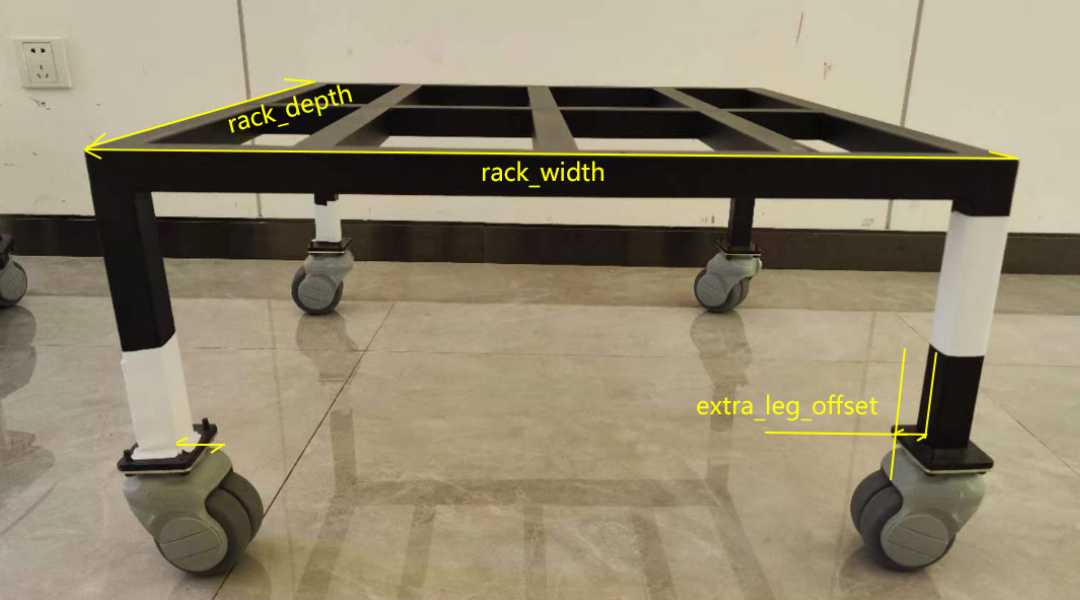
      // 某些货架具有超出轮轴基距的突出部分(如把手)。
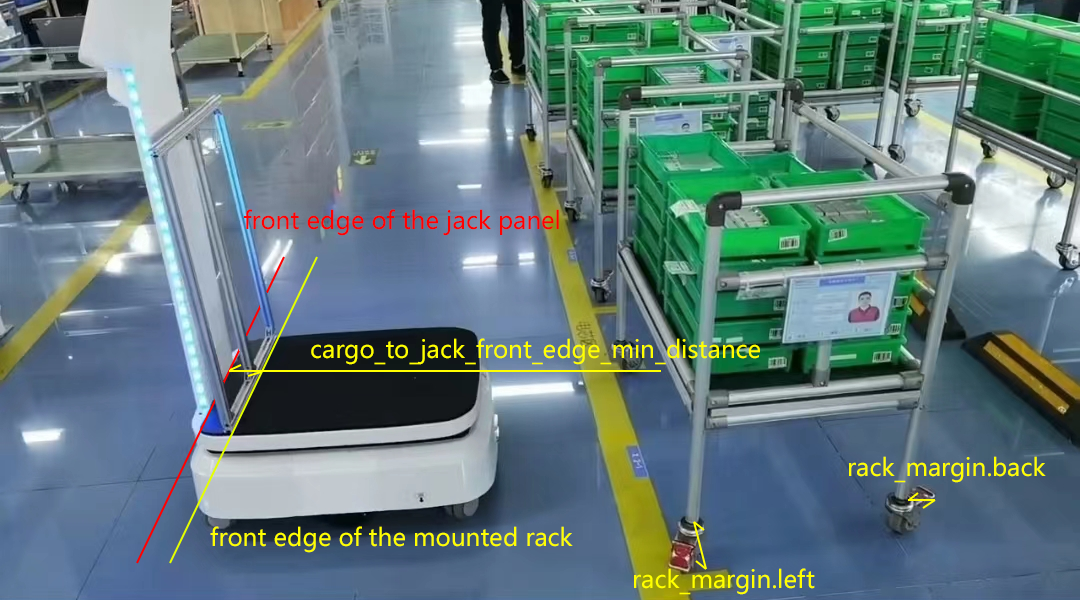
      "margin": [0, 0, 0, 0],

      "alignment": "center", // center(中心)/back(后部)。
      "alignment_margin_back": 0.02,

      // 某些货架腿的底板对激光扫描仪不可见。
      // 机器人在货架下方移动时将避开这一额外区域。
      "extra_leg_offset": 0.02,

      // 自 2.10 版本起:square(方形)/round(圆形)/other(其他)
      "leg_shape": "square",

      // 自 2.10 版本起:方形腿的边长或圆形腿的直径。
      "leg_size": 0.03,

      // 自 2.10 版本起。某些货架的脚轮对机器人的激光不可见。
      // 使用此参数可以扩大机器人的轮廓,防止碰撞。
      "foot_radius": 0.05
    }
  ]
}
width,depth: 货架尺寸。margin: 考虑腿部形成的矩形之外的突出部分。extra_leg_offset: 考虑对 LiDAR 不可见的向内突出的腿。cargo_to_jack_front_edge_min_distance: 货架挂载时,货架前边缘与顶升面板前边缘之间的距离。